
Understand Aviator auto bet settings on Bangbet Uganda, what to check before activation, and how to stop repeated betting and review your records.
Aviator auto bet settings let players repeat betting instructions across rounds. The essential tasks are to review the settings, enable repetition deliberately, and confirm that it has stopped.
This guide uses Bangbet’s published guidance alongside SPRIBE’s product information and published Aviator rules. Automation cannot predict results, guarantee returns, or remove the risk of losing each accepted stake.
What does auto bet mean in Aviator?
Auto bet controls repeated betting. Auto cash-out controls a different instruction: attempting to settle a wager at a selected multiplier if that level is reached.
Bangbet’s Aviator overview makes this distinction. Turning on automatic betting does not itself enable automatic cash-out.
SPRIBE’s published rules also describe these separately. Without the separate automatic cash-out setting, cash-out requires manual instruction. For that subject, understand Aviator cash-out rather than treating repeated betting as automatic settlement.
Where to find and review auto bet settings
Open the official Bangbet Aviator game. Use controls inside Aviator rather than unrelated sportsbook settings.
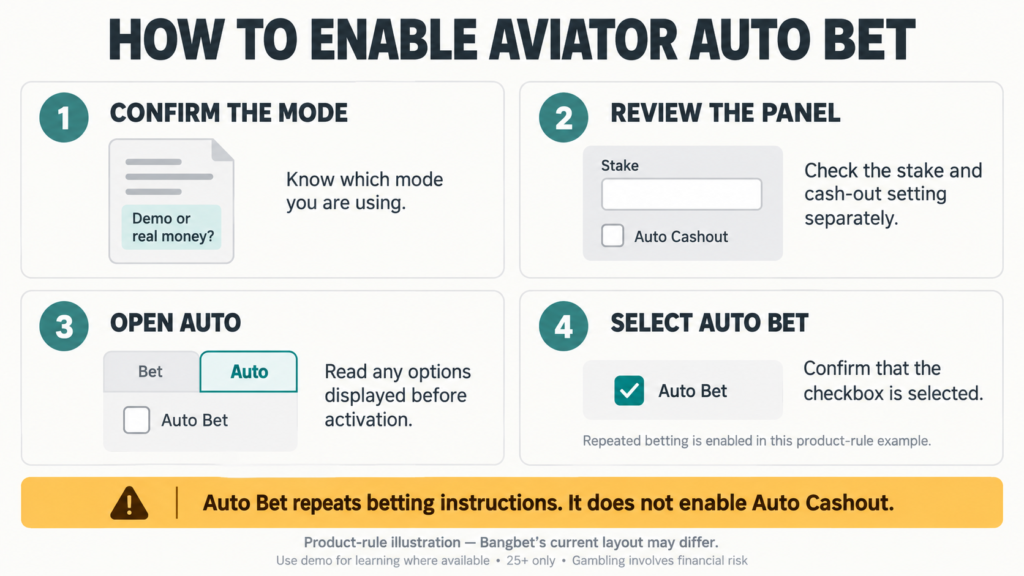
The published Aviator game rules describe an Auto tab within the betting panel and an Auto Bet checkbox. These are product-rule labels; the current Bangbet layout may differ.
Before selecting anything, review the stake in the intended panel. Check whether Auto Bet is already selected and inspect the separate Auto Cashout setting.
Read any stopping options actually displayed. This guide does not assume that Bangbet offers a round counter, loss threshold, or profit threshold. If a condition appears, check its units and explanation before relying on it.
Know how to return the repetition control to its inactive state. If the screen does not match the documented controls, consult the game’s help before proceeding.
Repeated small stakes can add up quickly. For example, ten accepted bets of UGX 1,000 represent UGX 10,000 wagered, regardless of the account’s final balance.
Set your own spending and time boundaries beforehand. A displayed stopping condition, where offered, should not replace monitoring your activity or deciding to stop.
How to enable auto bet deliberately
For the checkbox-based interface described in the product rules:
- Confirm whether the game is in demo or real-money mode.
- Review the stake in the chosen betting panel.
- Open the Auto tab.
- Check any available conditions and the separate cash-out setting.
- Select the Auto Bet checkbox deliberately.
- Confirm that the checkbox appears selected.
The published rules identify checking Auto Bet as the activation action. Do not assume that opening the Auto tab alone activates repetition.
Where a demo is available, learn the controls using virtual credits. Demo returns cannot be withdrawn.
How to stop Aviator auto bet
In a checkbox-based interface, return to the relevant panel’s Auto tab and clear the Auto Bet selection. Confirm that the checkbox is no longer selected. If your version uses different controls, follow its displayed help.
Treat this as checking the repetition setting. It is not proof that an accepted wager has been cancelled, refunded, or cashed out.
Separate three states when reviewing activity:
| State | What to establish |
| Future repetition | Is automatic betting visibly disabled? |
| Pending instruction | Does the game show it as cancelled or accepted? |
| Accepted wager | What result appears in its round record? |
Do not assume the same action handles all three. The published rules used here do not establish Bangbet’s precise cancellation timing.
Leaving the page, switching apps, or losing connection is not a visible confirmation that Auto Bet is off. Check the control and records instead.
Check both panels and your betting records
Aviator supports two betting panels. Bangbet explains that each represents a separate stake, so inspect both wherever available.
Review each panel’s stake and repetition status. Do not assume disabling one panel also disables the other. Using both increases the combined amount exposed, and both wagers can lose.
Then review your recorded Aviator bets. Bangbet’s guide distinguishes Aviator’s in-game records from sportsbook history.
Match the relevant time, stake, and round reference. Use records to establish accepted activity, not to predict subsequent rounds or justify another bet.
Common mistakes with automatic betting
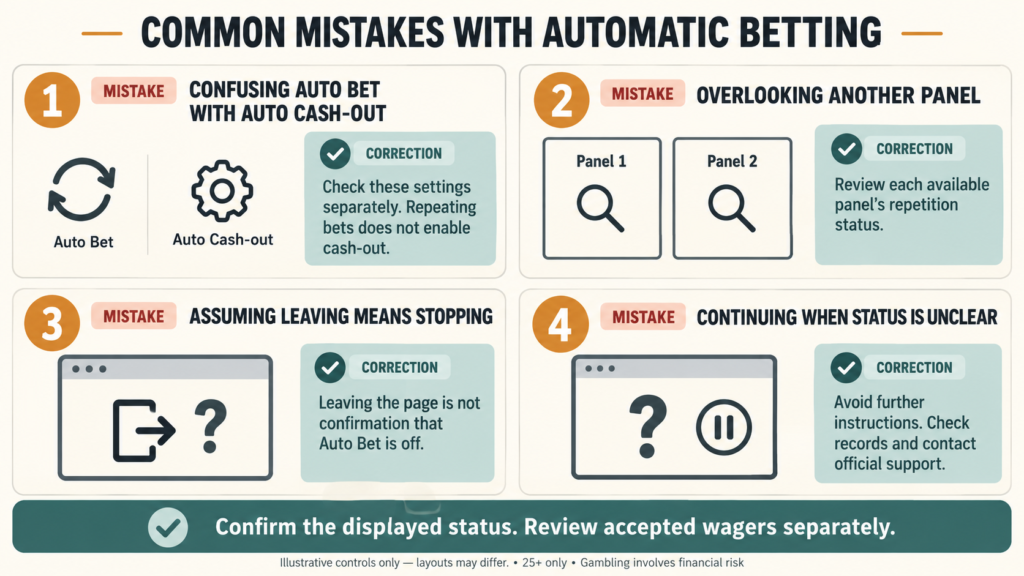
Confusing auto bet with auto cash-out: Review each instruction separately.
Overlooking another panel: Check every available panel before considering repetition disabled.
Assuming navigation stops betting: Leaving the screen does not confirm the setting changed.
Continuing through unclear status: Avoid additional instructions while investigating an error. Follow Bangbet’s guide to resolve loading or connection problems and contact support about uncertain records.
Provide the time in EAT and any round reference. Never disclose passwords, mobile-money PINs, or verification codes.
Frequently asked questions
Does auto bet automatically enable auto cash-out?
No. They are separate controls in the published rules.
Does disabling auto bet cancel an accepted wager?
Do not treat it as cancellation. Check the wager’s status and applicable rules.
Do I need to check both panels?
Yes. Review each available panel’s settings and accepted wagers.
What if the displayed status is unclear?
Avoid further instructions and contact Bangbet support.
Review the controls before using real money
Visit Bangbet Uganda for Aviator access and read the current help. 25+ only. Gambling involves financial risk. Set affordable limits, avoid chasing losses, and consult responsible-play guidance.
Verdict
Review the stake, distinguish betting from cash-out, and activate repetition deliberately. To stop, check that the repetition control is inactive on each relevant panel. Confirm accepted activity separately through records; current game rules govern timing and settlement.