Learn what happens when an MTN or Airtel Money wallet limit affects a Bangbet withdrawal and what to check before requesting payment again.
When an MTN Mobile Money or Airtel Money wallet reaches an applicable limit, a new casino withdrawal may be declined, remain pending, or be reversed instead of entering the wallet.
Reaching a limit does not automatically remove money from either account. A limit can block incoming funds even when the wallet is active, and the account owner entered correct details.
Check both histories, contact Bangbet Customer Care if anything is unclear, and never duplicate the withdrawal.
Which Mobile Money Limit Has Been Reached?
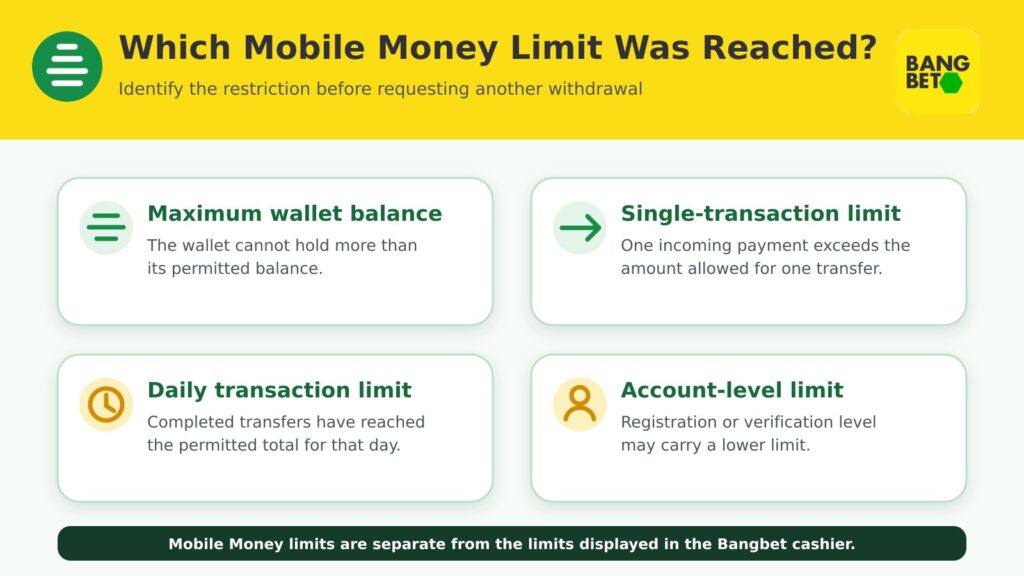
“Wallet limit” can describe several different restrictions:
- Maximum wallet balance: the wallet cannot hold more than its permitted balance.
- Single-transaction limit: one incoming payment exceeds the allowed amount.
- Daily transaction limit: completed transfers during that day have reached the permitted total.
- Account-level limit: the customer’s verification or registration category carries a lower limit.
These restrictions come from the Mobile Money provider and are separate from Bangbet’s cashier limits.
Bangbet’s deposit and withdrawal limits guide currently lists a minimum withdrawal of UGX 1,000 and a maximum of UGX 5,000,000 per transaction. The figure displayed in the live cashier remains the final platform reference.
MTN’s official Mobile Money tariff page publishes a UGX 5,000,000 transaction maximum and UGX 20,000,000 account balance. Its Key Facts Document shows different account levels.
Airtel customers should confirm current limits through official Airtel channels.
What Happens to a Bangbet Withdrawal?
If the wallet lacks capacity, the withdrawal may not arrive even within Bangbet’s limits. It may show pending before becoming rejected or reversed, with the amount restored to the Bangbet balance.
Never assume that a pending request has failed. Bangbet’s Uganda withdrawal guide advises customers to monitor the transaction and avoid submitting repeated requests while the first remains pending.
If Bangbet displays successful but the wallet has not been credited, retain the Bangbet reference and check the Mobile Money messages and statement.
Contact Bangbet Customer Care first so the payment can be traced. A successful label should be investigated rather than treated as permission to request the same money again.
What Should You Do Next?
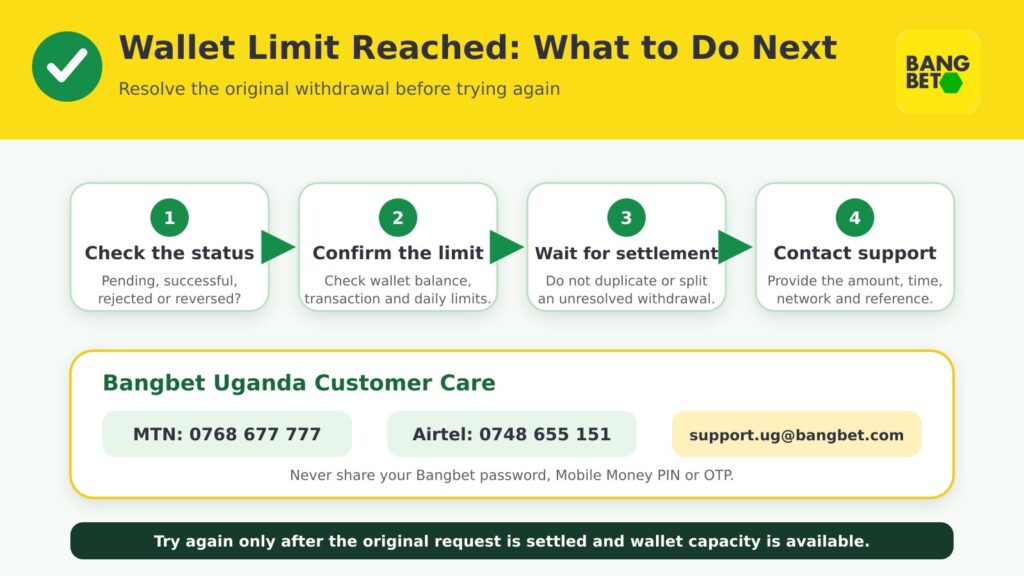
1. Check the exact transaction status
Open the Bangbet history and note whether the withdrawal is pending, successful, rejected, cancelled, or reversed. Then check the receiving wallet’s balance, recent transactions, and confirmation messages.
2. Confirm the relevant wallet limit
Use official MTN or Airtel support to confirm the maximum balance, transaction limit, and remaining daily capacity. Do not rely on unofficial or outdated information.
3. Wait for an unresolved request
Do not divide the amount into smaller withdrawals. That cannot solve a full wallet or exhausted daily allowance. Wait for the original request to settle or follow support’s instructions.
4. Create wallet capacity where appropriate
If the maximum wallet balance is the problem, using or withdrawing existing funds may create space. Check applicable charges and never move funds to continue gambling or chase losses.
5. Contact Bangbet Uganda Customer Care
Provide the registered number, network, withdrawal amount, submission time, displayed status, and transaction reference. Contact Bangbet on 0768 677 777, 0748 655 151, or support.ug@bangbet.com. The Bangbet support and complaints guide explains the official resolution route.
Never disclose your password, Mobile Money PIN, or OTP.
Can You Use Another Mobile Money Wallet?
Do not change the number or network while the withdrawal is unresolved. Bangbet payments should use the eligible account connected to the registered customer. Another wallet can trigger verification questions.
Ask Customer Care whether another supported method may be used after the first transaction is rejected, reversed, or cancelled.
Bangbet’s casino deposit and withdrawal guide identifies MTN Mobile Money and Airtel Money as the supported Uganda options displayed for eligible accounts.
Frequently Asked Questions
Does reaching the wallet limit make the money disappear?
No. Check whether the request is pending, rejected, reversed, or successful and reconcile both account histories. Contact support if the records do not agree.
Can I submit a smaller withdrawal immediately?
Not while the first request is unresolved. Wait for its final status and guidance from Customer Care.
When can I try again?
Try again only after the earlier request has settled, and the provider confirms that sufficient wallet and daily capacity is available.
Where can an unresolved Mobile Money complaint be escalated?
Complain to the provider first and retain the reference. The Uganda Communications Commission complaint portal accepts Mobile Money service complaints.
The Bank of Uganda’s supervised-provider directory identifies MTN Mobile Money Uganda Limited and Airtel Mobile Commerce Uganda Limited as supervised payment providers.
Check Your Wallet Before Withdrawing on Bangbet
Before requesting payment, open Bangbet Uganda and confirm the cashier limit, phone number, and Mobile Money capacity. Keep your reference and always contact Customer Care if status, balance, or arrival is unclear.
Adults aged 25 and above should gamble for entertainment, protect essential money, and never borrow or chase losses.
Conclusion
When a Mobile Money wallet limit is reached, a Bangbet withdrawal may be declined, delayed, or reversed. Check which limit applies, allow the original request to settle, and contact official support before trying again. Never duplicate a pending withdrawal or use an unregistered wallet to bypass a restriction.